I wanted to add comments to this Hugo blog, so I searched for “best Hugo comment plugin.”
The results were surprisingly thin. I found a Hugo forum discussion from 2023 and a Reddit thread from 2022, but no obvious answer. Both discussions offered long lists of names, and several of the services have changed, stalled or disappeared since then.
I already had some experience with the most obvious answer. I used Disqus on madebynathan.com for years, then it started placing ads above the embedded comments widget. I did not want someone else’s advertising inserted between an article and its discussion, so I removed Disqus and replaced it with giscus.
After going through the current options, my answer is:
FastComments is the one I would actually pay a dollar a month for. Giscus is the best free option for a technical audience. Remark42 is the best option if you want to host everything yourself. Do not use Cusdis right now, and if none of those appeal, running no comments at all is a perfectly respectable choice.
That is not where I started. I chose Cusdis first, on paper it was the obvious answer for this blog, and I installed it on Actually Random. Someone arriving from Google to read about bats or Adrien Brody should not need a GitHub account to leave a comment, and Cusdis is free for the first 100 approved comments each month.
Then I found two bugs. The widget does not size or theme itself correctly, which is annoying but fixable with about 40 lines of my own JavaScript. The second one is not fixable from my side: comments are hidden until approved, and the email that is supposed to tell you a comment is waiting never arrives. A moderation queue you cannot see is a shredder.
So I removed the comment box from this site. Both bugs are documented below, with the code, because I would rather this article save you the afternoon it cost me.
Why there is no actual Hugo comment plugin
Hugo generates static HTML. There is no application server waiting behind each article to receive a form submission and write the comment into a database.
A comment system therefore needs somewhere else to run. Most Hugo sites use one of three approaches:
- a hosted commenting service loaded with JavaScript;
- GitHub Issues or Discussions as the database;
- a separate comment server that the site owner maintains.
Hugo does include an embedded template for Disqus, but that is a convenience integration rather than a native commenting feature. Hugo’s documentation now lists many commercial and open-source alternatives.
The forum answer that aged best came from a user who said there was no objectively best solution. They used Isso because its Python application and SQLite database were easy for them to host. Another person recommended Cusdis but worried that comments could not be exported.
The Reddit thread reached the same problem from the other direction. GitHub-backed systems were easy to run, but the original poster said GitHub login did not suit their audience. A different commenter tried to install Isso, found it painful, and eventually got it working through Docker.
Those are still the two questions that decide the answer:
- Can the expected reader log in and comment without being annoyed?
- Who will operate the database five years from now?
The short comparison
| System | Hosting | Reader account | Price | Best for |
|---|---|---|---|---|
| Cusdis | Hosted or self-hosted | No login required | Free for 100 approved comments/month | Nothing, until two bugs below are fixed |
| FastComments | Hosted | Optional, anonymous supported | Usage based, often US$0.99/month | General blogs |
| giscus | GitHub Discussions | GitHub required | Free | Developer blogs and open-source projects |
| Remark42 | Self-hosted | Email, social or anonymous | Software is free | Owning the complete system |
| Hyvor Talk | Hosted | Email or guest options | From EUR5/month, billed annually | A polished managed community |
| utterances | GitHub Issues | GitHub required | Free | People who prefer Issues to Discussions |
| Isso | Self-hosted | No central account | Software is free | A small Python and SQLite deployment |
| Disqus | Hosted | Disqus, social or guest options | Free plan supported by advertising | Existing Disqus sites |
Prices and product details change, so check the linked pages before choosing. The figures above were current in July 2026.
The one I would have recommended: Cusdis, and why I cannot
Cusdis is a lightweight comment system that can be used as a hosted service or installed on your own server. Readers do not need an account, and Cusdis advertises its embedded widget at around 5KB gzipped. The loader script you actually put on the page is smaller than that: I measured cusdis.es.js at 3,334 bytes raw and 1,188 bytes over the wire with gzip, and it pulls the rest in afterwards.
The hosted free plan includes one site, 100 approved comments per month and 10 quick approvals per month. That is more than enough for a new blog that is unlikely to receive many comments. There is no server to maintain and no GitHub login to explain to readers. If the site ever grows beyond the free allowance, the current Pro plan costs US$12 per year and lifts all three limits.
Cusdis does not include an automatic spam filter. Instead, every new comment remains hidden until it is approved. That would become tedious on a busy publication, but at low volume it is a useful feature. Nothing strange, abusive or promotional appears publicly while I am asleep.
If you sign up with GitHub, turn notifications on immediately
This one deserves a warning, because it combines badly with the moderation model above.
I created my Cusdis account through GitHub. Cusdis then had no email address for me, for logins or for anything else. The consequence is that no comment notifications were ever sent. Every comment a reader left would sit unapproved and invisible, and I would have no idea any had arrived.
You can see the behaviour in the source. Notifications resolve the destination like this:
const notificationEmail =
  project.owner.notificationEmail || project.owner.email

if (project.owner.enableNewCommentNotification) {
  // ...
  try {
    this.emailService.send(msg)
  } catch (e) {
    // TODO:
  }
}
If both fields are empty there is no recipient, and the failure is swallowed by an empty catch. Nothing is logged, nothing is retried, and nothing tells you.
Cusdis does request the read:user,user:email scope from GitHub, so I assume the address goes missing when your GitHub email is set to private, as mine is.
The apparent fix takes a minute. Go to User then Settings in the Cusdis dashboard, fill in Email (for notification), and make sure Enable notification is switched on. The documentation mentions where to change the notification address, but not that it may be blank to begin with.
I did that. No notification email has ever arrived. I cannot see the hosted service’s logs, so I do not know whether the address is not being saved, the send is failing, or the mail is being dropped somewhere before my inbox. What I do know is that the empty catch above means a failure at that last step produces no error anywhere I can reach.
That is the bug that ended it for me. A moderated comment system that cannot tell you a comment is waiting is not a moderated comment system. It is a system that quietly discards your readers’ comments, and does it silently enough that you would never think to check.
There are a couple of reasons to remain cautious. The project’s GitHub README carries the line “Contact me if you want to buy/acquire this project”, and the newest tagged release there is v1.3.0 from November 2021. The repository has not been abandoned, with commits as recently as late 2025, but nearly five years without a release is a signal. A 2023 Hugo forum discussion also raised concerns about exporting comments. The hosted service is still operating and advertises version 1.4.0, so the cloud product has clearly moved on from the last tag. I would confirm the export process before building a valuable archive there.
When I started, that risk felt proportionate. The blog is new, the expected comment volume is tiny, and changing providers later would be easy. Cusdis got comments online without adding another bill or another server, and I was happy with it for about an hour.
If Cusdis fixes the iframe sizing and the notification email, I would use it again tomorrow. The idea is right and the widget is tiny. Until then, the free tier is free in the way that a car with no brakes is cheap.
Best paid hosted option: FastComments
FastComments is a managed comment service that works with an ordinary JavaScript embed. It supports anonymous comments, moderation, spam filtering, email notifications, live updates and Markdown. On cookies the company is specific: “You are not required to add a cookie banner on your site if you use FastComments. We only add functional cookies for logging in, and do not add any tracking cookies.”
Its current pricing is unusually friendly to small sites. The headline is one plan where you pay for what you use, starting at US$0.99 per month, with usage charges for page loads and stored comments, both billed at US$1 per 100,000, plus add-ons for extra moderators and SSO users.
There is a 30-day trial with no credit card required, and no permanent free tier, although the company says it makes exceptions for open source documentation. That seems fine to me. A dollar per month is a reasonable price for a real service that stores data, fights spam and sends email. “Free forever” is less comforting when the free project stops being maintained and takes the comment archive with it.
FastComments also says its comment threads can be indexed by search engines. I would not choose a comment system only for SEO, but indexable replies are preferable to hiding useful discussion inside an opaque iframe forever.
The main downside is dependence on a commercial provider. It advertises API access and audit logs, though I did not find an explicit one-click export on the pricing page, so I would confirm that before committing an archive to it. It also has far more community features than a tiny new blog needs. I can ignore most of them.
Having watched Cusdis silently swallow its own notifications, this is the one I would reach for next. It removes the GitHub barrier without requiring me to run a server, and a paid product has an obvious incentive to make sure the email that says “you have a comment” actually gets sent.
Best free option: giscus
Giscus stores each article’s comment thread in GitHub Discussions. It is open source, free, has no ads or tracking, supports reactions and themes, and does not need a database. Moderation happens in GitHub.
The setup page generates a script tag after you select a public repository, a Discussion category and a mapping method. Giscus can associate a page with a discussion using its path, URL or title. If no discussion exists, its bot creates one when the first reader comments.
This is close to perfect for a programming blog or open-source project. The comments remain visible and manageable in a GitHub repository, and there is no separate service bill. Giscus can also load lazily, so the iframe is deferred until the reader scrolls near it.
The catch is substantial: every commenter must authorize the giscus GitHub app or visit the Discussion and comment there. That is acceptable when most readers are developers. It is a conversion-killing wall on a general-interest site.
Actually Random has its source on GitHub, so giscus was my first instinct. Then I imagined explaining GitHub OAuth to someone who only wanted to say that panang curry is better than green curry.
Giscus or utterances?
Utterances is the older and slightly simpler version of the same idea. It stores comments in GitHub Issues rather than Discussions. It is also open source, free of ads and tracking, and requires GitHub OAuth.
I would choose giscus for a new site. Discussions were designed for conversations and include reactions, categories and threaded replies without mixing blog chatter into the repository’s bug tracker. Giscus also documents a migration path from utterances by converting existing Issues into Discussions.
Utterances remains a good system. There is simply little reason to start with Issues unless you prefer their workflow or already have an established archive there.
Best self-hosted option: Remark42
Remark42 is the strongest option for someone willing to operate a comment server. It supports email login, a range of social providers and optional anonymous comments. It includes nested replies, Markdown, moderation, voting, reply notifications, RSS feeds, image uploads, JSON export and automatic backups.
It does not require an external database. Remark42 stores everything in one embedded data file, ships as a self-contained executable and provides a Docker setup. One instance can serve multiple sites.
The project is also visibly alive. Its GitHub repository has over 5,500 stars, and version 1.16.4 was released on 10 July 2026, which happens to be the day I checked. That makes it a safer self-hosted choice than adopting a project whose last release was several years ago.
The cost is operational. I would need to deploy it, configure authentication and email, monitor it, back it up and keep it patched. I already run enough servers. Adding one to preserve comments about whether bats can echolocate feels excessive.
For someone who wants control, privacy and no vendor dependency, Remark42 would be my choice.
Isso is simpler, but still a server
Isso remains a respectable small comment server. It uses Python and SQLite, supports Markdown, moderation, editing and deletion, and can import comments from Disqus or WordPress. It is still maintained: version 0.14.0 landed in March 2026.
The Hugo forum user liked it precisely because it was easy for them to host. The Reddit commenter had the opposite experience and struggled until switching to Docker. Both accounts can be true. Isso is small once it is running, but a static-site owner still needs a server, a database file, backups, HTTPS and updates.
I would consider Isso if I already had a simple Python hosting environment and wanted a deliberately limited feature set. Remark42 appears to be the more complete and actively moving choice for a new deployment.
Hyvor Talk if you want a polished fixed-price service
Hyvor Talk is a more expensive hosted option. Its Personal plan currently costs EUR5 per month, available on annual billing only, and includes one website, one moderator, 2,500 credits per month, and comments, reactions and ratings.
It is a cleaner answer for someone who wants a conventional managed product with predictable support and does not mind paying EUR60 per year. I prefer FastComments for a new low-traffic blog because the entry price is much lower, but Hyvor may be easier to budget once traffic grows.
What about Disqus?
Disqus is the only system for which Hugo ships a dedicated embedded partial. Add a shortname to hugo.yaml, call the partial from the theme and comments appear.
That integration explains why Disqus dominates older Hugo tutorials. It is also why I used it on madebynathan.com for so long.
I eventually noticed advertisements appearing above the comments widget. They were not ads I had placed or chosen, and their position made them look like part of my article. Removing the advertising required moving away from the free arrangement or accepting Disqus as another ad network on the page. I removed the widget instead and switched the blog to giscus.
Giscus has its own GitHub-login limitation, but it is free, clean and stores the discussions somewhere I control. That trade was easy for madebynathan.com, which has a long history as a technical blog and already attracts plenty of readers with GitHub accounts.
My experience with the ads is the main reason I would not recommend Disqus for a new Hugo site. Built-in support saves a few minutes once; the consequences of the provider choice last for years.
Adding any comment system to PaperMod
PaperMod makes provider choice simple. It ships an empty comments.html partial for you to override, and calls it from single.html behind a single condition:
{{- if (.Param "comments") }}
{{- partial "comments.html" . }}
{{- end }}
Its comments documentation tells you to create this file:
layouts/partials/comments.html
That path is worth a note, because recent Hugo versions moved theme templates into a _partials directory, and the copy of PaperMod I am running keeps its own partials there. The documented layouts/partials/comments.html override still works on Hugo 0.164 through backward compatibility. I checked, because I did not believe it.
Paste the provider’s embed code into that partial, then enable comments in hugo.yaml:
params:
  comments: true
For Cusdis, the partial can look like this after replacing the app ID:
<div id="cusdis_thread"
  data-host="https://cusdis.com"
  data-app-id="YOUR_APP_ID"
  data-page-id="{{ .RelPermalink }}"
  data-page-url="{{ .Permalink }}"
  data-page-title="{{ .Title }}"
  data-theme="auto">
</div>
<script async defer src="https://cusdis.com/js/cusdis.es.js"></script>
Using Hugo’s relative permalink as data-page-id gives each article a stable thread even if the site later changes domains. The full permalink and title identify the public page in the Cusdis dashboard.
Because the condition is .Param, the site-wide setting can be overridden per post. Comments are disabled on an individual article by adding this to its front matter:
comments: false
The widget renders near the bottom of each article and does not appear on the home page, the archive or any other list page, because single.html is the only template that calls the partial. The Cusdis script is loaded with async defer, so the article does not wait for the comment service before rendering.
This site ran exactly that for a few hours. There is no comment box below this article any more, because I took it out again for the reason described above. The instructions are still correct, and the same partial works for any provider: swap the Cusdis embed for a FastComments or giscus one and nothing else changes.
The widget arrives broken, and you have to fix it yourself
When I first deployed the embed above, the comment form appeared inside a squashed white box about 150 pixels tall. You could scroll the form up and down inside it, like reading a novel through a letterbox.
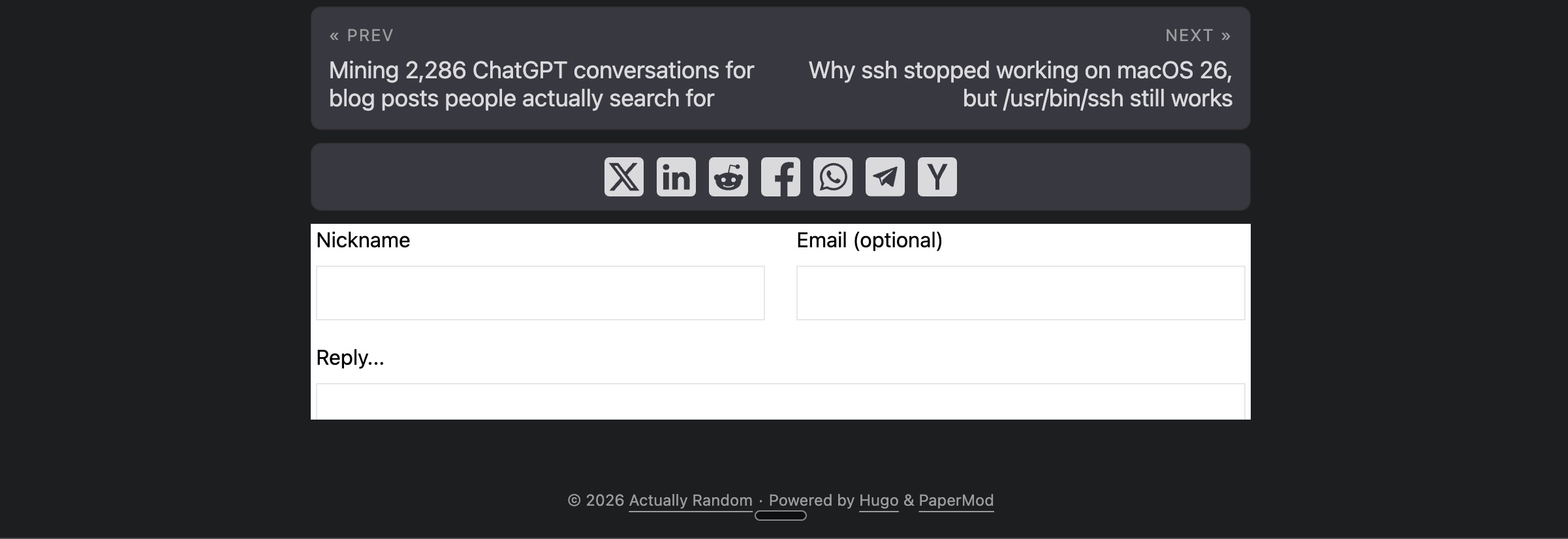
Two things are wrong in that screenshot. The box is too short, and it is white on a dark site despite data-theme="auto". They turn out to be the same bug.
Cusdis renders the thread inside a srcdoc iframe. Its loader sets exactly two styles on that iframe:
singleTonIframe.style.width = "100%";
singleTonIframe.style.border = "0";
It never sets a height. There is only one place a height is ever assigned, and it happens in response to a message from inside the iframe:
case "resize": { iframe.style.height = msg.data + "px"; }
So 150 pixels is not a max-height set by Cusdis or by PaperMod. I went looking for it in both and it is in neither. It is the default height the HTML specification gives an <iframe>, which is 300 by 150. The iframe is simply never resized, so the default stands.
The theme is broken for the same reason. auto is resolved by the loader only when the iframe reports that it has loaded:
case "onload": {
  if (target.dataset.theme === "auto") {
    postMessage("setTheme", darkModeQuery.matches ? "dark" : "light");
  }
}
Both symptoms trace to one thing: messages sent from the iframe to the parent page are not arriving. Inside the frame, the code does window.parent.postMessage(JSON.stringify(...)), with no targetOrigin argument, once on load and again from a MutationObserver whenever the thread changes. I confirmed the effect rather than the cause. Rendering the deployed page in headless Chrome and reading the iframe’s inline style after everything had settled gave me this:
width: 100%; border: 0px;
No height, ever.
The fix is easier than the diagnosis. A srcdoc iframe inherits the origin of the page that created it, so the parent can reach into contentDocument and measure the real content. Messages going the other way, from parent into the frame, work fine, which means CUSDIS.setTheme can be called directly instead of waiting for a handshake that never completes.
(function () {
  var mount = document.getElementById("cusdis_thread");
  if (!mount) return;

  function fit(frame) {
    var doc = frame.contentDocument;
    if (!doc || !doc.documentElement) return;
    var h = Math.max(
      doc.documentElement.scrollHeight,
      doc.body ? doc.body.scrollHeight : 0
    );
    if (h > 0 && frame.style.height !== h + "px") frame.style.height = h + "px";
  }

  function isDark() {
    var t = document.documentElement.dataset.theme;
    if (t) return t === "dark";
    return window.matchMedia("(prefers-color-scheme: dark)").matches;
  }

  function syncTheme() {
    if (window.CUSDIS && window.CUSDIS.setTheme) {
      try { window.CUSDIS.setTheme(isDark() ? "dark" : "light"); } catch (e) {}
    }
  }

  function tick() {
    var frame = mount.querySelector("iframe");
    if (frame) { fit(frame); syncTheme(); }
  }

  new MutationObserver(tick).observe(mount, { childList: true, subtree: true });
  new MutationObserver(syncTheme).observe(document.documentElement, {
    attributes: true, attributeFilter: ["data-theme"]
  });
  window.matchMedia("(prefers-color-scheme: dark)").addEventListener("change", syncTheme);
  window.addEventListener("resize", tick);

  var poll = setInterval(tick, 400);
  setTimeout(function () { clearInterval(poll); tick(); }, 20000);
  tick();
})();
The full version in this site’s comments.html also attaches a MutationObserver and a ResizeObserver to the iframe’s inner document, so the frame grows as comments load rather than only when the poll fires. The bounded interval is a safety net for the first paint, and it stops after twenty seconds. A min-height in CSS keeps the frame from collapsing before the first measurement.
Reading dataset.theme rather than only the media query matters on PaperMod, because its light and dark toggle writes data-theme onto the html element and stores the preference in localStorage. Watching that attribute means the comment box follows the toggle instead of ignoring it.
After deploying, the same headless check reports height: 380px, and the iframe’s inner document carries an explicit color-scheme: dark. The letterbox is gone.
I do not love that a comment widget needs 40 lines of my own JavaScript to display at the correct size. On its own I would have shrugged and moved on, because the fix works and I had already written it. It is the second bug, the one where nobody tells you a comment is waiting, that made me delete the widget rather than patch around it. Together they are a fair illustration of the earlier caution: the hosted service is up, but the code around it has not had a release since 2021, and it shows.
My answer
The phrase “best Hugo comment plugin” suggests there should be a package to install and an obvious winner. Hugo’s static design pushes the important decision outside Hugo: where should the comments live, and how much friction should readers face?
My current choices are straightforward:
- Use FastComments when you want a managed service that works, and a dollar a month is not the obstacle.
- Use giscus when the audience already uses GitHub.
- Use Remark42 when owning and operating the backend is part of the plan.
- Avoid Cusdis until the iframe sizing and the notification email are fixed.
- Run no comments at all if none of that appeals.
That last option deserves more respect than it usually gets. Comments are not free even when the software is. Somebody has to read them, approve them, and decide what to do about the person who is angry about bats. The cost is attention, and a new blog with no readers has nothing to moderate anyway.
So Actually Random has no comments today. When I want them, I will pay FastComments a dollar a month, because the thing I actually need from a comment system is not a widget. It is confidence that a stranger’s words reached me. Cusdis gave me a widget and lost the words.